Setting up before you have traffic
A brand-new agent has no tool history yet. Start from a template, replace its placeholders, and switch it on once traffic arrives.
The Protect page builds rules from the tools your agent has used. A new key has none yet – so the tools table is empty and the risk flows have nothing to tick. Use a template instead.
1. Open the Advanced editor
On the key’s Protect page, click Advanced editor, then the Templates tab.
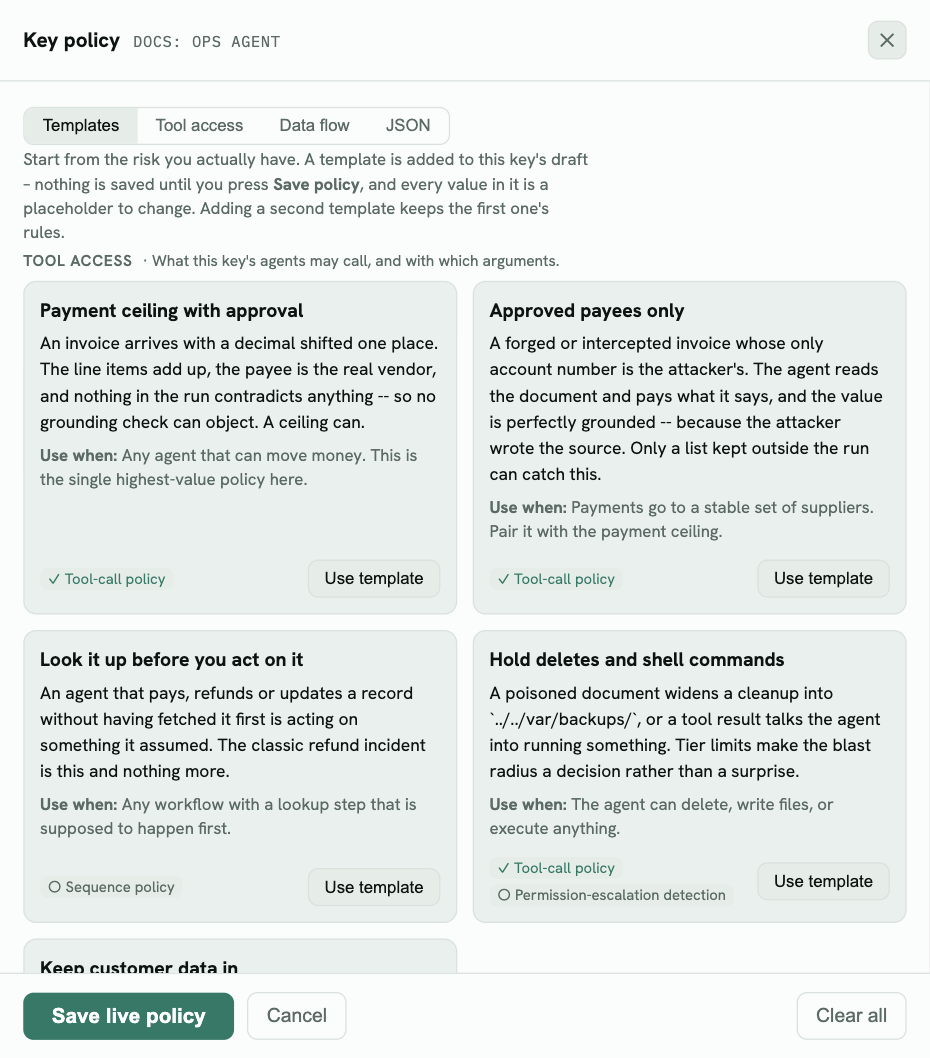
Templates come in two groups:
- Tool access – what the agent may call: a payment ceiling, approved payees, look-it-up-first, holding deletes, keeping customer data out of tool calls.
- Data flow – where what it read may go: a web page can’t drive an action, HR records stay with HR, finance data leaves only with a sign-off, subagent reads.
Each card shows the settings it needs: ✓ means on, ○ means off.
2. Use a template and replace the placeholders
Click Use template. It’s added to the draft and a box lists what to change. Every value is a placeholder – *@example.com, read_hr_*, a sample IBAN. Replace them with your real addresses, tool names and accounts.
Placeholders are caught. Publishing a policy that still contains template placeholders asks you first – a room whose members are
*@example.comprotects nothing.
Click Save to draft.
3. Switch it on once traffic arrives
Send some agent traffic with the key (with X-Guardrails-Session-Id). Back on the Protect page, the tools table fills in – check that the rule names match real tools (a rule that matches no tool is flagged under the table), then follow Preview, watch, then enforce.